VPN Glossary
VPN Glossary: protocols, IP, DNS, encryption
Use this glossary to decode VPN terms quickly. It is written for Canadians who want clarity without deep networking jargon.
Who this is for
Readers who want a quick reference while comparing VPN advice, security checklists, or Wi-Fi guidance. It works for beginners and technical users alike.
Glossary terms
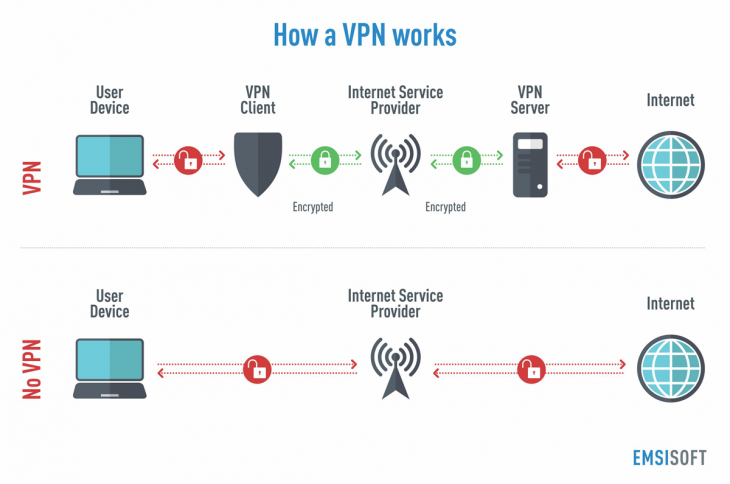
VPN Tunnel
A protected connection between your device and a VPN server that encrypts traffic.
IP Address
The numeric address that identifies your device on the internet.
DNS
The system that translates website names into IP addresses.
Encryption
Mathematical protection that scrambles data so it cannot be read in transit.
TLS 1.3
A modern encryption standard that protects data in transit. Learn more in the IETF TLS 1.3 RFC or the RFC editor summary.
Protocol
The set of rules that define how data is sent and protected over a network.
What to do / Why it matters
- What to do: Learn the terms before comparing VPN advice. Why it matters: It prevents confusion and marketing claims.
- What to do: Pay attention to encryption and protocols. Why it matters: These define how data is protected.
- What to do: Use the glossary while reading guides. Why it matters: It keeps your decisions grounded in facts.
When a VPN helps
- Understanding how encryption protects public Wi-Fi traffic.
- Evaluating VPN safety checklists with better context.
- Explaining network terms to family or coworkers.
When a VPN does NOT help
- It cannot replace strong passwords or MFA.
- It does not fix malware or unsafe downloads.
- It cannot hide your identity from every website.
Common mistakes
- Assuming all encryption terms are the same.
- Ignoring DNS privacy and leak risks.
- Mixing up protocols with applications.
Next steps
Read VPN Basics and then review VPN Myths & Truths. Return to the VPN Hub for the full roadmap.