VPN Basics
VPN Basics: What it is, how it works
A VPN is a tool that encrypts your internet connection and routes it through a secure server. This page explains the basics in simple terms so you can make smarter decisions in Canada.
What a VPN is
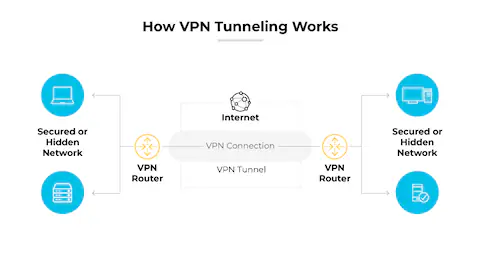
VPN stands for Virtual Private Network. It creates a protected tunnel between your device and a trusted server so your traffic is harder to intercept. For a simple definition, see Simple English Wikipedia or the more detailed Wikipedia VPN article.
How a VPN works
- Your device connects to a VPN server instead of going directly to websites.
- Data is encrypted in transit, which reduces risks on public networks.
- Websites see the VPN server location instead of your home IP address.
Who this is for
Canadians who work remotely, travel often, or rely on shared Wi-Fi at cafés, airports, and schools. Tech users who want to understand the basics without marketing noise will also benefit.
What to do / Why it matters
- What to do: Use a VPN on public Wi-Fi. Why it matters: It adds an encrypted tunnel that lowers risk.
- What to do: Keep your device updated. Why it matters: A VPN cannot protect unpatched software.
- What to do: Learn the limits. Why it matters: It is not a total privacy shield.
When a VPN helps
- Public Wi-Fi in cafés, hotels, or airports.
- Remote work sessions that involve sensitive documents.
- Reducing ISP tracking of the sites you visit.
When a VPN does NOT help
- It will not stop phishing emails or unsafe downloads.
- It does not fix weak passwords or reused logins.
- It cannot secure a device already infected with malware.
Common mistakes
- Leaving the VPN off when switching networks.
- Assuming a VPN makes you anonymous.
- Skipping device security basics like updates and backups.
Next steps
Learn more in our VPN Safety Checklist or explore VPN Myths & Truths.